
Office Ergonomics Training – [Complete Video Kit]
$239

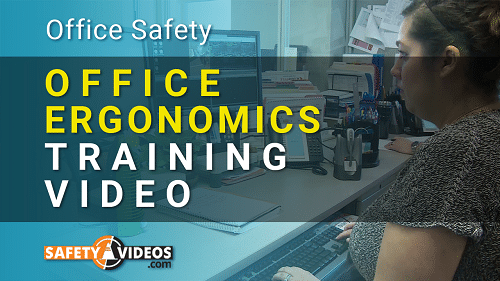
One of the most pressing issues among office workers is how ergonomics might affect their daily well-being. This Office Ergonomics training video will help educate your office workers on the ways proper body ergonomics can help them prevent injuries while completing their job duties. The training video covers many important areas of office ergonomics.
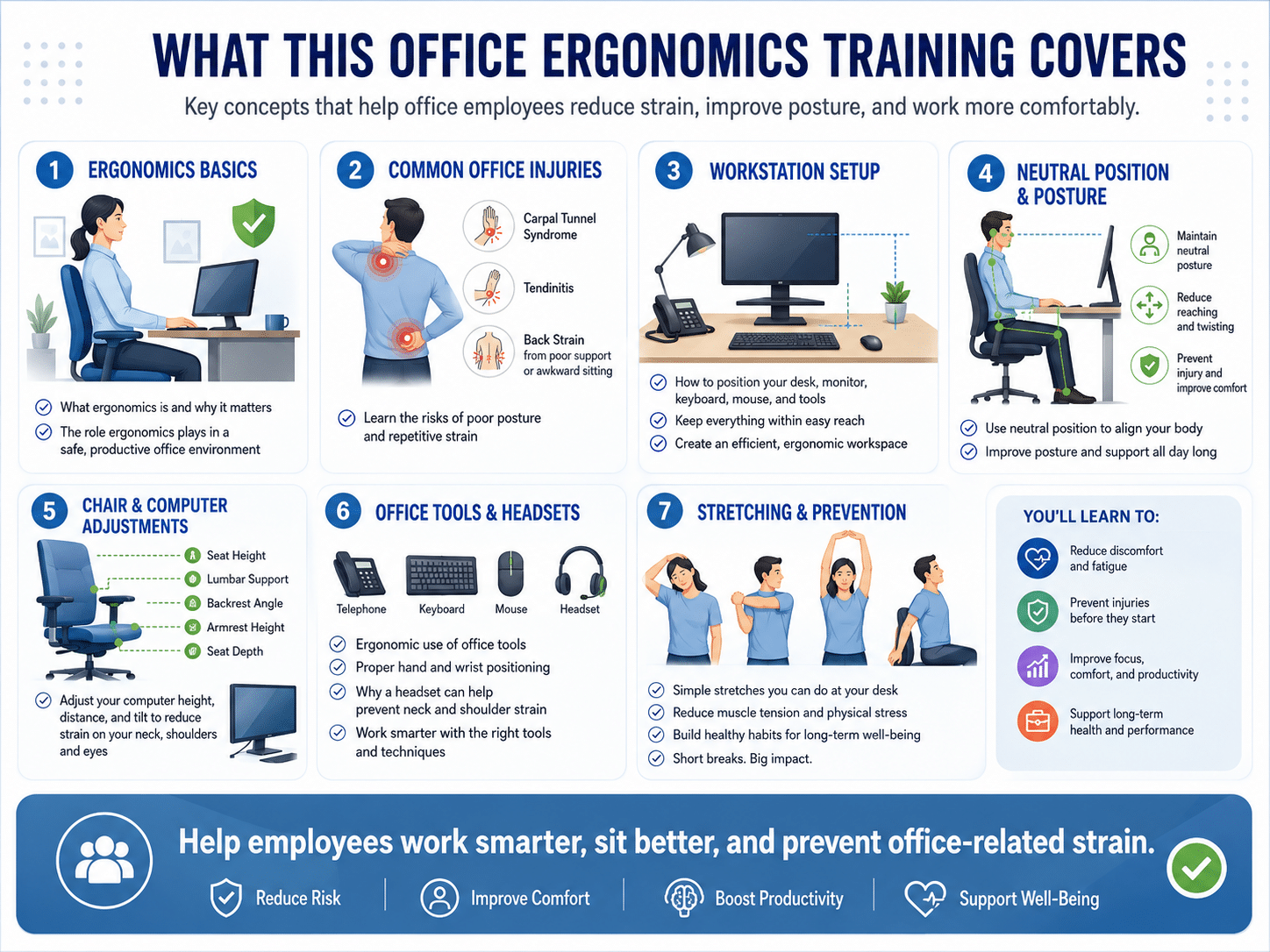
- How is ergonomics defined, and what role does it play within an office environment?
- What are some key areas that office staff should focus on when it comes to their ergonomic well-being?
- What is carpal tunnel syndrome and how can it be prevented?
- How is your back affected by sitting, improper back support, or sitting in awkward positions?
- What is tendinitis, and what are some steps to take to prevent it?
- How office staff can properly and ergonomically use the tools they are given (i.e., telephone, computer, keyboard, mouse, etc.)
- What role can a telephone headset play in preventing injuries?
- How to properly arrange your desk so that everything is in the perfect and ergonomically correct position
- What is a “neutral position,” and how can we utilize it to help improve posture, avoid unnecessary reaching, and prevent injury?
- How to properly adjust an office chair so that it is ergonomically correct and ensures proper support of your body
- How can your computer be adjusted so that it causes the least amount of strain on your arms, shoulders and neck?
- What are some simple stretching exercises that can help office workers reduce the amount of stress on their bodies?
- and much more…
Office Ergonomics Training Delivery Options
When companies plan safety training, office staff are the group most often left out — and yet office injuries are real, common and expensive. This program is built to make training them straightforward. The complete kit ships on DVD or USB in English or Spanish, so you can run a single group session in a conference room, hand the drive to a branch manager, or work through it desk by desk. OSHA’s own guidance says training should be conducted in a language and vocabulary that all workers understand, which is why the Spanish version carries the full course rather than a summary.
If you would rather not manage discs at all, this course is also available through our online safety training library, either on its own or as part of a subscription covering 250+ courses. Online completions are tracked automatically and each employee’s certificate is issued on completion, so you get the same documentation without collecting a sign-in sheet. The kit is a one-time purchase with no per-seat licensing either way.
This Complete Office Ergonomics Safety Training Program Includes These Items:
Office Ergonomics Training is a complete, ready-to-run training program, not just a video file. The 17-minute-54-second course is the centerpiece, and everything an employer needs to deliver it, test it and document it comes in the box. One purchase trains your whole office, this year and every year after.
- Full-length office ergonomics training video — 17 minutes 54 seconds, on DVD or USB, in English or Spanish
- Employee quiz — checks that your staff understood neutral positions, desk setup and early MSD symptoms
- Answer sheet — for fast grading after a group session
- Presenter’s Guide — run the session yourself, with the discussion points laid out in order
- Printable training sign-in sheet — the attendance record that shows who was trained and when
- Printable Training Completion Certificate — editable with each employee’s name and the training date, and completely reusable, so there is no per-employee or per-session cost
Why Your Office Staff Needs Ergonomics Training
There is no OSHA ergonomics standard. Congress rescinded the original rule under the Congressional Review Act, which also bars OSHA from issuing a substantially similar one. That does not leave employers off the hook: ergonomic hazards are cited under the General Duty Clause, Section 5(a)(1), when a recognized hazard exists, is likely to cause serious physical harm, and a feasible means exists to reduce it. What it does change is how an employer demonstrates diligence. OSHA states that it “will not focus its enforcement efforts on employers who are making good faith efforts to reduce ergonomic hazards” — and a delivered training program, with a signed attendance record and dated completion certificates, is precisely what a good-faith effort looks like on paper.
OSHA also publishes what effective ergonomics training should achieve. Workers should learn the principles of ergonomics and how to apply them, learn the proper use of their equipment and tools, adopt good work practices, become aware of the tasks that lead to pain or injury, and recognize the early symptoms of musculoskeletal disorders. This program delivers all five. Two further outcomes on OSHA’s list — understanding the importance of reporting early indications of injury, and knowing your reporting procedures under 29 CFR Part 1904 — are specific to your workplace, so they are not part of the video. Cover them yourself in the session; the Presenter’s Guide leaves room for it, and pairing the two is what turns a video into a program.
The injuries themselves are not abstract. The course explains that ergonomic injuries occur when ligaments, tendons, muscles, nerves or bones are subjected to stresses they were not built for, and that this can happen suddenly or gradually. It names the two conditions OSHA itself lists as classic musculoskeletal disorders: carpal tunnel syndrome, where repetition inflames the wrist and squeezes the median nerve, producing numbness, tingling and sometimes severe pain in the hands and fingers; and tendinitis, where inflamed tendons cause pain in the hands, arms, shoulders, feet or legs. Lower back pain from awkward postures and poor back support rounds out the set. For a fuller catalog of these conditions and how they build up over time, see our guide to cumulative trauma disorders.
What makes ergonomics a good investment is that the fixes are mostly free. The course works through the desk itself: keeping the tools you reach for most within 14 to 18 inches and as many as possible directly in front of you, so you are not twisting; swapping a cradled telephone handset for a headset before it becomes a crick in the neck; not forcing a stapler or a paper cutter past what it was designed to do. Then it sets up the body: a chair adjusted so your forearms meet your upper arms at 90 to 120 degrees, firm lumbar support in the forward curve of your lower back, thighs roughly parallel to the floor and feet flat — a footrest if they do not reach, because dangling feet put real stress on the spine. Then the computer: wrists flat rather than bent, the mouse close by and moved with the whole arm instead of the wrist, and the monitor 16 to 27 inches away at a 5 to 20 degree downward viewing angle.
Finally, it covers what a well-arranged desk cannot fix on its own. Sitting still for long stretches is not healthy no matter how good the setup, so the course teaches short desk stretches with specific counts — five slow neck turns held three seconds each, shoulder push-backs held five seconds, hand and finger extensions repeated five times per hand — plus a simple three-step deep-breathing exercise for the stress that tightens muscles and makes injury more likely. It closes on the everyday habits that make an employee more resilient: regular aerobic exercise, balanced meals, and steering clear of smoking, heavy drinking and drugs.
Who Needs This Training
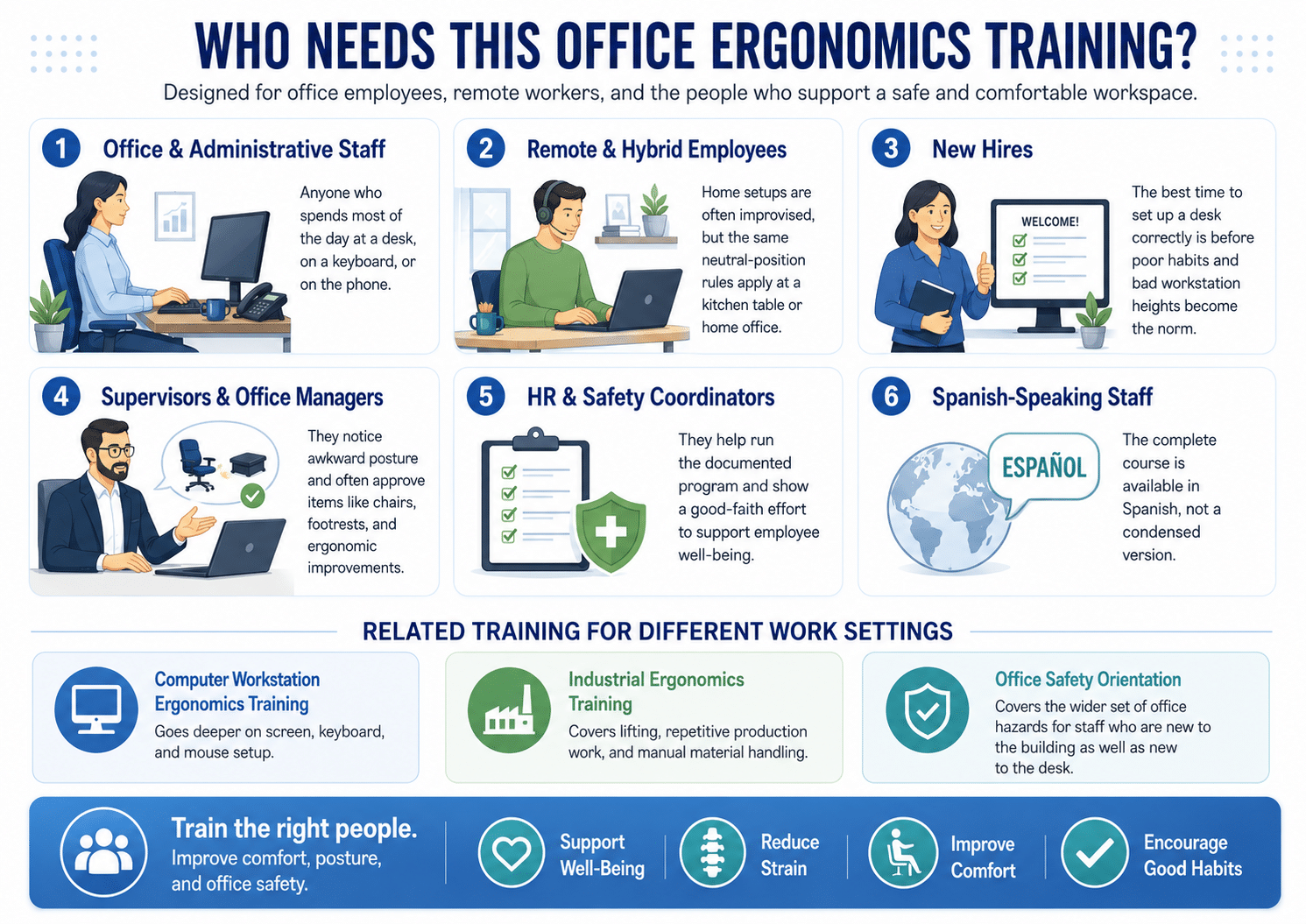
- Office and administrative staff — anyone who spends most of the day at a desk, on a keyboard or on the phone
- Remote and hybrid employees — home setups are improvised far more often than office ones, and the same neutral-position rules apply to a kitchen table
- New hires — the cheapest moment to set up a desk correctly is before someone has spent six months at the wrong height
- Supervisors and office managers — the people who will notice an employee working in an awkward posture, and who sign off on a chair or a footrest
- HR and safety coordinators — running the documented program that evidences a good-faith effort
- Spanish-speaking staff — the complete course is available in Spanish, not a condensed version
Employers with a mix of settings usually need more than one course. If your team spends its day on a computer specifically, Computer Workstation Ergonomics Training goes deeper on screen, keyboard and mouse setup. If you also run a plant, warehouse or shop floor, Industrial Ergonomics Training covers lifting, repetitive production work and manual material handling instead. And for staff who are new to the building as well as new to the desk, Office Safety Orientation covers the wider set of office hazards.
Office Ergonomics Training Video Full-Length Preview:
FAQs on Office Ergonomics Training
Answered by our in-house OSHA Authorized Trainer – Jason Hessom

Have a question for us? Call us at 800-859-1870 or Contact Us Via Email
No — and it is worth understanding why, because it changes what an employer should do. There is no OSHA ergonomics standard. Congress rescinded the original rule under the Congressional Review Act, which also prohibits OSHA from issuing a substantially similar one. Ergonomic hazards are instead addressed under the General Duty Clause, Section 5(a)(1), where OSHA looks at whether a hazard exists, whether it is recognized, whether it is likely to cause serious physical harm, and whether a feasible means exists to reduce it. OSHA has stated that it will not focus its enforcement efforts on employers making good faith efforts to reduce ergonomic hazards, so what matters is being able to show the effort. This program is built for that: the sign-in sheet records who attended and when, the quiz shows the material was understood, and the dated Certificate of Completion is the record you keep on file.
No single video can satisfy §5110, and this one does not — but it supports the training element of it. California’s Title 8 §5110 applies where two or more employees performing identical work activity have suffered repetitive motion injuries that were predominantly caused by that work, objectively diagnosed by a licensed physician and reported within the previous 12 months. Where it applies, it requires a worksite evaluation, control of the exposures identified, and training. This course supports three of the required training elements: the exposures associated with repetitive motion injuries, the symptoms and consequences of those injuries, and the methods used to minimize them. It does not cover your own program specifics or your reporting procedures, and it cannot perform the worksite evaluation or implement the exposure controls — those remain the employer’s responsibility. California employers should read §5110 in full and use this program as one documented component of their response.
The course runs 17 minutes 54 seconds and works from the causes outward. It defines ergonomics as fitting the things we use to the people using them, then covers the three risk factors behind office injuries: repetitive movements, awkward body positions, and excessive force or using the wrong tool. It explains what ergonomic injuries actually are — ligaments, tendons, muscles, nerves and bones under stresses they were not built for — and names carpal tunnel syndrome, tendinitis and lower back pain as the common results. From there it becomes practical: organizing your desktop so frequently used items sit 14 to 18 inches away, replacing a cradled telephone handset with a headset, not forcing a stapler or paper cutter past its design, adjusting a chair for a 90 to 120 degree forearm angle with proper lumbar support, positioning a keyboard so wrists stay flat, and setting a monitor 16 to 27 inches away at a 5 to 20 degree downward angle. It finishes with short desk stretches, a three-step deep-breathing exercise for stress, and the general habits — regular aerobic exercise, balanced meals, avoiding tobacco and heavy drinking — that make employees more resistant to injury.
Training cannot prevent, diagnose or treat a medical condition, and nothing in this program should be read as medical advice — carpal tunnel syndrome and tendinitis are diagnosed by a licensed physician. What training does is address the exposures behind them. Both conditions are musculoskeletal disorders, which OSHA lists among its own examples of MSDs, and both are strongly associated with repetition, awkward wrist and arm positions, and sustained force. The course teaches employees to keep wrists flat rather than bent while keyboarding, to move the whole arm rather than the wrist when using a mouse, to type gently, and to recognize early symptoms such as numbness and tingling in the hands and fingers. Reducing those exposures is the recognized way to lower risk. Employees who are already experiencing symptoms should be directed to a healthcare professional and to your own reporting process.
No. There is no OSHA ergonomics certification for employees, and this program does not make anyone a certified ergonomist — that credential is awarded by the Board of Certification in Professional Ergonomics after its own examination and experience requirements, and nothing sold here is a route to it. What the kit includes is a Training Completion Certificate, which is a training record documenting that a named employee completed this course on a given date. That record is the useful thing for most employers: it is what evidences a good-faith effort to reduce ergonomic hazards, and it is what you produce if anyone asks what training your office staff has received.
The kit contains three pieces of documentation and they work together. The printable sign-in sheet records attendance — who was in the room and on what date. The employee quiz, with its answer sheet, shows the material was actually understood rather than just played. The Training Completion Certificate is then issued per employee; it is editable with the employee’s name and the training date, and it is completely reusable, so there is no per-employee or per-session cost no matter how many people you train or how many times you run the session. Keep all three together and you have a straightforward, dated file showing what was delivered, to whom, and when. If you run the course through our online library instead, completions are tracked automatically and certificates are issued on completion.
The complete kit ships on either DVD or USB drive, and you choose English or Spanish at checkout. The Spanish version is the full course, not a condensed one — OSHA’s guidance is that training should be conducted in a language and vocabulary all workers understand, so it is worth ordering the language your staff actually work in. The video itself runs 17 minutes 54 seconds, which fits comfortably inside a half-hour session with time for the quiz and for your own discussion. Every format includes the same supporting materials: quiz, answer sheet, Presenter’s Guide, sign-in sheet and the reusable Certificate of Completion. It is a one-time purchase with no per-seat licensing and no annual renewal.
Yes. The same office ergonomics course is available through our online safety training library, either on its own or as part of a subscription that covers 250+ safety courses. The online version suits remote and hybrid staff, multiple locations, and anyone who would rather not track physical media: employees work through it at their own desks, completions are recorded automatically, and each certificate is issued on completion, so you get the same documentation without collecting a sign-in sheet. Buying the DVD or USB kit instead makes more sense when you want to run one group session in a room, because the Presenter’s Guide and the printed materials are built for exactly that.
8 reviews for Office Ergonomics Training – [Complete Video Kit]
![Office Ergonomics Training - [Complete Video Kit]](https://www.safetyvideos.com/wp-content/uploads/2022/02/products-84-2-150x150.png.webp)


A great video for improving office safety
We’ve had a lot of computer workstation injuries lately. We decided to take a look at those workstations from an ergonomic perspective and made some improvements. We also got this trainign for our employees to help them as well. Good training
Very important for us since most of our employees are desk jockeys day in and day out.
Our employees said they got a lot out of this training.
We liked the training and the materials that came with the video